愤怒小猪崽,你好!
我为你翻译了一下英文技术文稿,有些终端代码你需要参考英文原版:
如果您需要卸载Rosetta 2,请按照以下步骤操作:
- 关闭你的Mac。
- 按住电源按钮,直到出现启动选项。
- 单击选项>继续。
- 选择您的帐户并输入您的密码。
- 单击实用程序>终端。
- 复制并粘贴以下命令,然后按Enter键在Mac上禁用SIP。
- csrutil禁用
- 输入您的用户名和密码。
- 单击苹果标志,然后选择重新启动。
- 从启动台>其他打开终端。
- 复制并粘贴以下命令,然后按Enter键获取需要删除的文件、目录和LaunchAgents列表。
- pkgutil --files com.apple.pkg.RosettaUpdateAuto
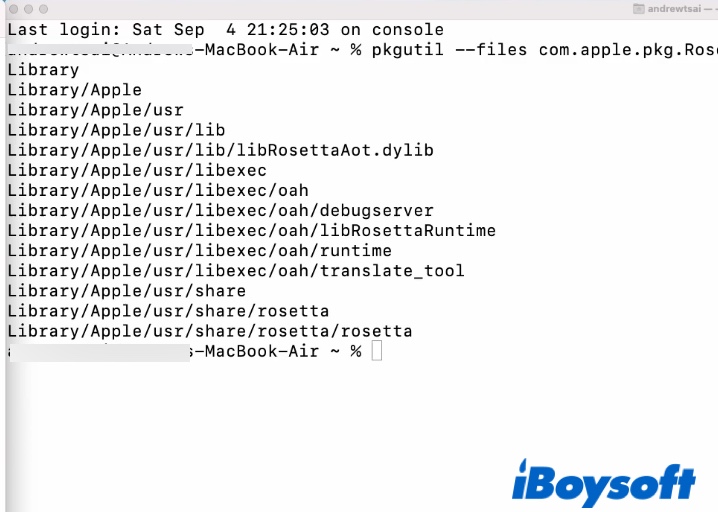
- 打开Finder,然后单击Go > Go to Folder。
- 输入/Library/Apple/usr/,然后按Enter键。
- 导航到/Library/Apple/usr/lib/libRosettaAot.dylib,右键单击它并选择“移动到废纸篓”。
- 输入您的密码,然后按确定。
- 导航到/Library/Apple/usr/libexec和/Library/Apple/usr/share/rosetta,也删除这两个文件夹。
- 清空你的垃圾。
- 重复步骤1到5。
- 执行以下命令,在Mac上重新启用SIP。
以下是英文原版:
If you need to uninstall Rosetta 2, follow these steps:
- Shut down your Mac.
- Press and hold the power button until the startup options appear.
- Click Options > Continue.
- Select your account and enter your password.
- Click Utilities > Terminal.
- Copy and paste the command below, and press Enter to disable SIP on your Mac.
- csrutil disable
- Type in your username and password.
- Click the Apple logo and choose Restart.
- Open Terminal from Launchpad > Other.
- Copy and paste the command below, and press Enter to obtain a list of files, directories, and LaunchAgents you need to delete.
- pkgutil --files com.apple.pkg.RosettaUpdateAuto
- Open Finder and click Go > Go to Folder.
- Input /Library/Apple/usr/ and hit Enter.
- Navigate to /Library/Apple/usr/lib/libRosettaAot.dylib, right-click on it and choose Move to Trash.
- Enter your password and press OK.
- Navigate to /Library/Apple/usr/libexec and /Library/Apple/usr/share/rosetta, delete these two folders as well.
- Empty your Trash.
- Repeat steps 1 to 5.
- Execute the command below to re-enable SIP on Mac.
- csrutil enable
来自 https://iboysoft.com/news/uninstall-rosetta-2.html。
若以上文档未能解决您的问题,请联系 Apple 支持来获得更多协助。请点击以下链接,选择“Apple ID”:https://getsupport.apple.com
希望可以帮助到你,谢谢!
[图像经过版主编辑]

